Table of Contents
WordPress SEO Fundamentals for 2026
In 2026, the core of WordPress SEO still rests on content quality, intentional keyword targeting, and technical essentials like fast load times and mobile-friendly design. For businesses that operate locally, WordPress local SEO—including integrations with Google Business Profile and map-based discovery—is imperative to capturing nearby intent. These on-page and technical fundamentals are indispensable, but they’re now just the starting point for a comprehensive strategy.
The rise of AI-powered search engines means traditional tool suites like Webstack SEO are being outpaced by always-on, agentic approaches. At hashtag.org, our Agentic SEO—powered by the BRON engine built on 22 years of search expertise—makes your WordPress site discoverable by AI assistants, chatbots, and generative answer engines. It’s the difference between a static website and a dynamic, map-pinned discovery gateway that continuously adapts. Up next, we’ll explore how our platform transforms these fundamentals into an integrated agentic visibility strategy.
Before You Begin
Before you start using WordPress search engine optimization (WordPress SEO) with Agentic AI, make sure you have these prerequisites:
- An active WordPress website where you have full administrator access. This allows you to configure essential settings, install WordPress SEO extensions, and ensure your site is ready for integration with Agentic AI.
- A registered hashtag.org account and a claimed #name portal. Claim your #name to create a geo-pinned gateway that anchors your WordPress local SEO and makes your content visible to AI agents.
- Familiarity with the core concepts of Agentic AI and Agentic SEO. As hashtag.org describes, Agentic SEO optimizes your website for answer engines and autonomous agents, moving beyond traditional search indexing.
- A good grasp of the official WordPress documentation guide to confirm your site’s basic configuration and security are in order.
With these four elements confirmed, you have created the ideal foundation for WordPress SEO powered by Agentic AI. The setup ensures that your site is technically sound, your online identity is anchored on the map, and you understand the principles behind agentic optimization.
Now you are ready to weave Agentic SEO into your WordPress site. In the next section, we’ll guide you through linking your #name portal to your WordPress installation so that AI agents can start discovering your content.
Install Essential WordPress SEO Plugins
With a reliable hosting provider in place, the next critical step is to equip your site with the right tools. WordPress SEO begins by adding a dedicated extension that automates critical on-page optimization tasks.
Instructions
Log into your WordPress dashboard and navigate to the Extensions section by clicking ‘Extensions’ in the left sidebar, then ‘Add New.’ In the search field, type a well-rated SEO extension such as Yoast, Rank Math, or All in One SEO. Once you locate the right tool, click Install Now, then Activate. After the setup wizard completes, your site’s WordPress SEO foundation—like meta titles and descriptions—is instantly in place. The WordPress Foundation’s official documentation confirms this process is straightforward and keeps your site secure.
Why It Matters
A properly configured extension streamlines meta tag generation, XML sitemap creation, and real-time content analysis—all essential for WordPress local SEO and broader visibility. For deeper automation, we recommend complementing your work with AI SEO services from hashtag.org, which can handle more advanced optimization tasks.
Tips
Begin with a single extension to prevent conflicting features and performance drag. Schedule regular updates to maintain compatibility with the latest WordPress core and security best practices. For sites that outgrow conventional add-ons, our AI-driven services can either complement your stack or replace manual optimization entirely, freeing you to focus on content and growth.
Optimize On-Page Content for Target Keywords
On-page SEO for WordPress SEO aligns each page with target keywords and user intent. It requires research, structure, and consistency.
Instructions
Start by researching keywords with tools like Google Keyword Planner or our AI agents to identify terms with search volume. Place the primary keyword in the H1, first 100 words, and at least one H2. Write naturally for humans, using long-tail variations like WordPress local SEO instead of repeating the same phrase. Optimize image alt text with keywords. Our agentic SEO tools can generate content and analyze on-page elements, but AI output needs human review.
Why It Matters
Keyword-optimized content signals relevance to search engines, improving organic rankings, especially for competitive terms like WordPress SEO. When pages match user intent, they attract and retain visitors, which are core ranking factors and build trust over time. This alignment is essential for sustained visibility.
Tips
- Write for readers: prioritize clarity and natural language over keyword density.
- Use long-tail variations like WordPress SEO tools to capture specific queries.
- Update older posts regularly to maintain freshness and ranking potential.
- Our AI agents can also audit pages and suggest improvements, though results depend on your implementation.
Configure Technical SEO Foundations
A solid technical foundation is the bedrock of effective WordPress SEO — without it, even the best content struggles to rank. Before optimizing individual pages, configure these core technical elements so search engines and AI discovery agents can find, crawl, and index your #portal efficiently.
Instructions
- Set clean permalinks. Use a structure like /category/post-name/ to include relevant keywords and improve crawlability.
- Enable SSL. Activate an SSL certificate through your hosting; it’s a ranking signal and security requirement that protects visitor data.
- Speed up delivery. Implement browser caching, minify CSS and JavaScript files, and adopt a CDN to reduce load times globally.
- Activate Agentic SEO. Our platform’s AI orchestration automates technical SEO tasks that usually demand several WordPress SEO tools — sitemap generation, crawl audits, and meta tag optimization — so your portal stays technically sound without manual upkeep.
Why It Matters
Proper technical SEO ensures search engines can crawl and index your site without errors or delays, directly affecting rankings. A fast, secure site pleases both visitors and search engines. For portals targeting local audiences, site optimization also strengthens local SEO visibility in local search results, helping your geo-pinned #portal appear when nearby users search.
Tips
Use a CDN for faster asset delivery and minify CSS/JS to shrink file sizes. Leverage browser caching to serve returning visitors quickly. Run regular site audits through Agentic SEO’s automated checks to catch broken links, slow pages, and crawl issues before they impact performance. Service provided as is; outcomes depend on third-party algorithms and your own actions.
Implement Local SEO Strategies
Traditional wordpress seo helps websites rank, but local businesses need targeted visibility. At hashtag.org, we leverage Agentic AI to automate local SEO—geo-pinned portals, schema markup, and citation building—so you can focus on serving customers in your local area.
Instructions
Start by claiming your #name portal and optimizing your Google Business Profile. Our agents auto-populate updates and embed LocalBusiness schema from portal content. For sites requiring wordpress local seo, create location-specific pages; hashtag.org generates GEO-optimized landing pages that feed geo-pinned discovery signals to both searchers and AI agents.
Why It Matters
Local SEO lands your business in Google’s local pack and map results, connecting you with customers in your local area. As AI search grows, traditional methods fade. hashtag.org’s Agentic SEO builds proximity search optimization signals that AI agents trust, giving you a persistent edge.
Tips
Collect reviews via your portal—GIGI, our AI assistant, responds authentically. Maintain NAP consistency; our platform auto-corrects directory listings. Always review AI-generated content before publishing. For businesses moving from traditional wordpress seo to Agentic SEO, claiming your #name ensures your channel, your name, your rules.
Build a Strong Backlink Profile
Instructions
A strong backlink profile is essential for success in WordPress SEO. We recommend these ethical methods:
- Guest posting on relevant industry blogs to earn contextual backlinks.
- Broken link building: find dead links on authority sites and offer your content as replacement.
- Content promotion through social media and outreach to attract organic citations.
- Leveraging partnerships with complementary businesses for cross-promotional link opportunities.
- Earning local citations from directories to strengthen your WordPress local SEO.
- Using AI-driven backlink analysis to streamline opportunity discovery.
- Distributing link equity across your site through strategic internal linking.
Why It Matters
High-quality backlinks from authoritative sites build trust and improve domain authority, directly boosting rankings for your WordPress SEO. The Association of National Advertisers emphasizes earning links through credible, value-driven methods to avoid penalties. This approach sustains long-term search visibility and protects your site’s reputation.
Tips
- Prioritize quality over quantity: a few links from high-authority sites carry more weight than many low-quality ones.
- Avoid paid links and black-hat tactics; the Association of National Advertisers warns these shortcuts risk penalties.
- Treat link building as an ongoing process—regularly audit your backlinks, nurture partnerships, and refine your strategy to sustain growth.
Monitor and Analyze SEO Performance
Monitoring is the essential follow-up to every WordPress SEO effort—without measurement, previous optimizations remain invisible. We'll walk through setting up core tracking tools and interpreting the metrics that matter.
Instructions
Start by connecting your site to Google Search Console and Google Analytics. These tools give you visibility into how search engines and users interact with your pages. Monitor impressions, clicks, click-through rate (CTR), and average ranking position to identify trends. Build a custom dashboard in Google Analytics that centralizes these SEO metrics alongside Core Web Vitals data for a quick health check.
Why It Matters
Continuous monitoring reveals which WordPress SEO tactics drive traffic, alerts you to indexation errors, and ensures your strategy adapts. For local businesses, tracking WordPress local SEO by merging Google Business Profile insights with Search Console data gives a complete view. Our AI Visibility Monitoring adds a next-gen layer by tracking AI agent citations.
Tips
We recommend these practical monitoring habits:
- Schedule automated weekly Google Analytics email reports.
- Monitor Core Web Vitals in Search Console.
- Use heatmaps to refine page layouts.
- Install WordPress SEO tools for on-page health alerts.
Regular keyword ranking reviews turn data into iterative improvements.
Enhance SEO with Agentic AI Tools
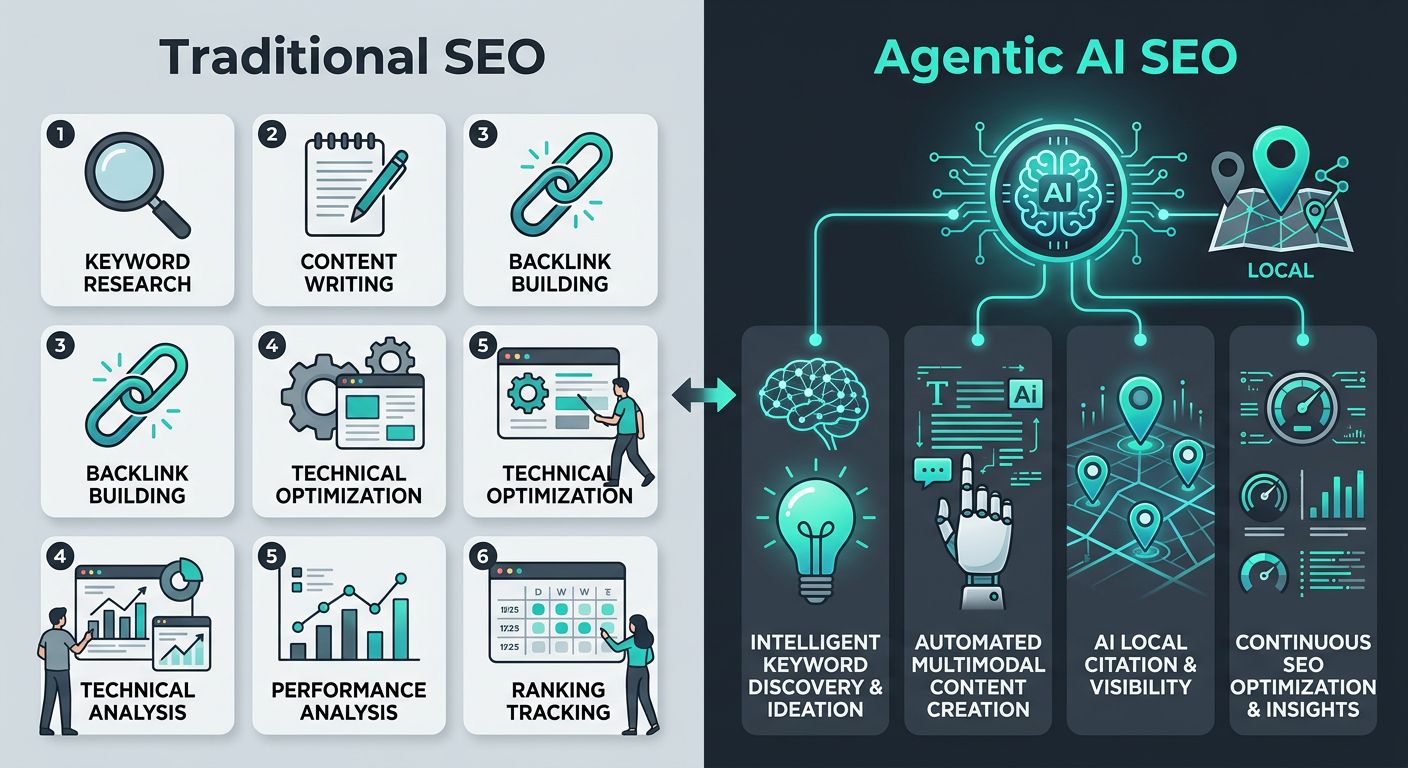
WordPress SEO can be dramatically amplified by integrating Agentic AI — self-running assistants like GIGI that automate content optimization, lead generation, and round-the-clock engagement.
 Comparing traditional manual SEO with agentic AI automation.
Instructions
We embed GIGI into your WordPress site via an iframe or API. After training on your brand voice and product details, the agent writes and updates SEO-friendly copy, answers visitor questions around the clock, and strengthens your WordPress local SEO through your geo-pinned #name portal — your channel, your name, your rules.
Why It Matters
Agentic AI runs 24/7, automatically optimizing pages and adapting to search changes — far more efficient than static WordPress SEO tools. Though no tool can guarantee rankings, continuous refinement noticeably boosts organic visibility and lead capture.
Tips
Train your agent on your brand voice and pair its output with manual keyword research and quality backlinks. Always review AI-generated content before publishing. Next, see real-world cases of agentic SEO amplifying your WordPress search engine optimization.
Resolving Common WordPress SEO Issues
Many website owners find WordPress SEO challenging, as common issues like missing meta descriptions, slow page speed, broken links, duplicate content, and poor mobile optimization can undermine their search visibility. Rather than relying on a patchwork of extensions, we can turn to AI-powered solutions to detect and fix these problems. Our agentic AI for SEO tool scans your site for on-page and technical gaps, then recommends precise adjustments—no extra software required.
WordPress’s core settings already address many SEO fundamentals. The Permalink settings let you create descriptive, keyword-rich URLs. Image compression and alt text in the media library boost page speed and accessibility. To avoid duplicate content, designate your preferred canonical domain under General Settings. And WordPress automatically generates XML sitemaps to help search engines find all your pages. These built-in features eliminate the need for external software for most on-page optimizations.
For WordPress local seo, consistent NAP data across your site and Google Business Profile is critical—our AI agents can scan your pages to flag discrepancies. Apply fixes incrementally and track your rankings in Google Search Console; steady monitoring reveals what works. As your on-site SEO matures, claiming your #name on hashtag.org anchors your identity for the coming agentic era.
With common issues resolved, the next section shows you how to integrate Agentic AI tools directly into your WordPress routine for automated, on-going improvements. Keep in mind that no ranking outcome is guaranteed; AI-generated content may contain errors, and search algorithms change frequently.
Mastering WordPress SEO in the Age of AI
In the age of AI, mastering wordpress seo remains essential. While AI-driven search evolves, your site’s architecture and content quality still govern discoverability. Aligning with standards from the Association of National Advertisers reinforces your WordPress SEO strategy.
We at hashtag.org use Agentic AI to power our SEO for WordPress, automating keyword research, content optimization, and technical audits. Our BRON engine continuously monitors your site, while persona-cloned AI agents optimize content for answer engines. This streamlines local WordPress SEO, helping you capture geo-targeted traffic without manual work.
For agencies, our white-label SEO tools, underpinned by Agentic SEO, offer a scalable turnkey solution. Our guide to Webstack alternatives explains how to resell our agentic stack under your brand. Even with AI, structured data and technical SEO remain vital—they help generative search engines interpret your site and boost visibility. Next, we’ll walk through implementing these AI tools on your WordPress site.
Resources
- Discover Agentic SEO With Autonomous Monitoring and AI Agents
- Discover AI SEO Services Optimized for Answer Engines
- Discover Agentic SEO for Continuous AI Optimization
- Use AI Agent Orchestration for Autonomous Marketing
- Explore AI-Powered Website Builder With Autonomous Agents
- Automate Marketing Tasks With AI Agent Orchestration
- Learn How the Hash Symbol Evolved From Libra Pondo
- Explore the WordPress Documentation Portal for All Skills
- Access ANA Member Resources and Events for Marketers