
Table of Contents
- Advanced GA4 Reporting Integration Strategies
- Connecting GA4 to Looker Studio for Client-Facing Reporting
- Defining and Using GA4 Custom Dimensions in Looker Studio
- Tracking Offline Conversions in Google Analytics 4
- Managing GA4 Token Usage Limits in Large-Scale Reporting
- Building an Omnichannel Marketing Dashboard with GA4 Data
- Elevate Your Analytics with Advanced GA4 Integrations
Advanced GA4 Reporting Integration Strategies
Building on standard GA4 implementation, advanced GA4 reporting integration unlocks deeper marketing intelligence. We combine GA4 data with ai market intelligence marketing intelligence through our agentic AI, creating automated, insight-driven workflows.
Our sophisticated GA4 reporting setups focus on three core approaches:
- Custom event tracking for AI interactions – We create GA4 events to monitor user engagement with our AI agents and geo-pinned portals, capturing metrics like session starts and booking completions.
- Audience-triggered agent personalization – We configure GA4 audiences based on behavior segments. These segments then trigger personalized responses from our AI agents, tailoring experiences in real time.
- Nexus data enrichment – We import key GA4 conversion and engagement data into our Nexus tool. This enriches AI conversation logs with marketing metrics, revealing which interactions drive actual business value.
These advanced GA4 integration approaches rely on native GA4 and hashtag.org APIs, avoiding external plugins. Outcomes depend on proper implementation and market conditions. As a next step, validate your data streams and test custom events to ensure accurate AI-driven decisioning.
Connecting GA4 to Looker Studio for Client-Facing Reporting
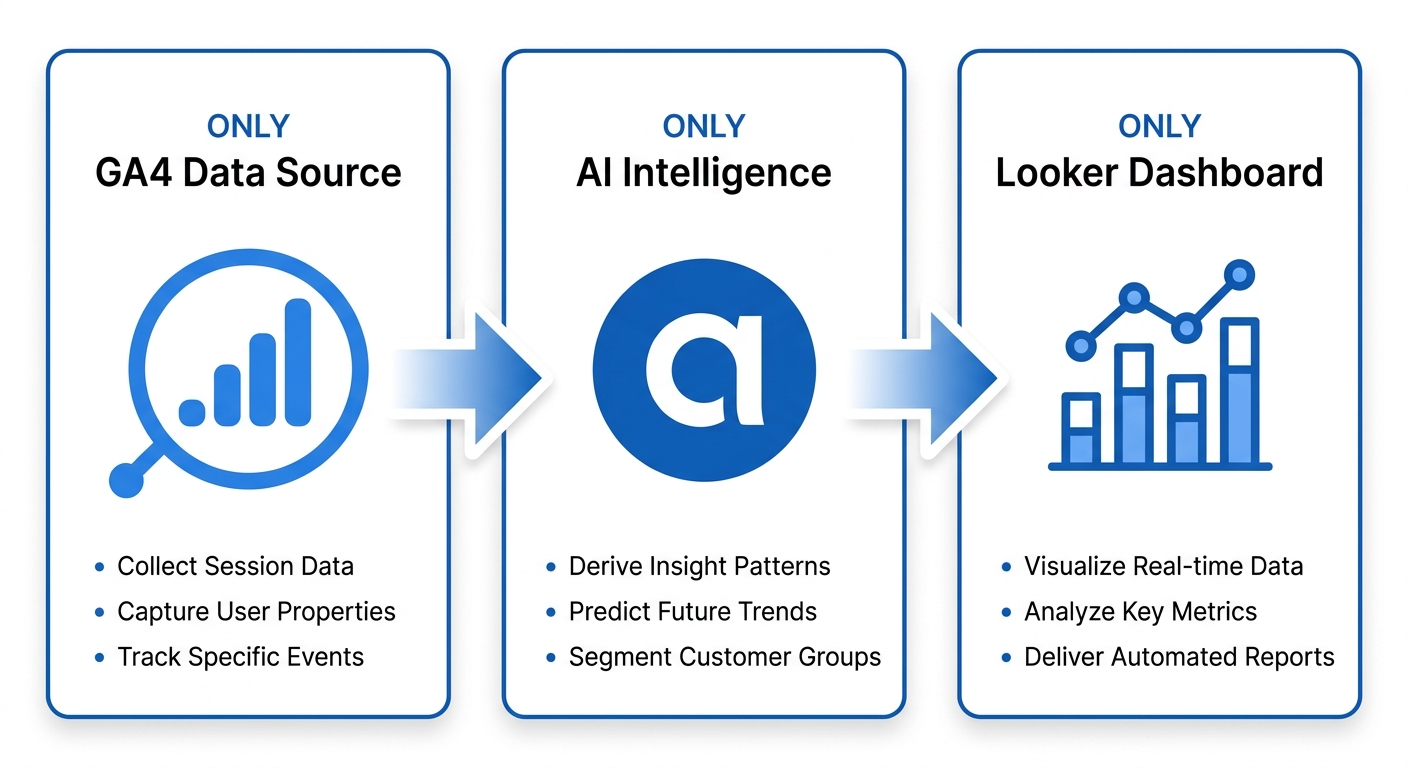
Building on a robust GA4 data strategy, the next critical step is creating a transparent and automated reporting pipeline that clients can easily understand. An advanced GA4 reporting integration with Looker Studio transforms raw analytics into digestible visual insights. This connection is essential for agencies aiming to deliver real-time performance overviews without manual data wrangling. A unified reporting setup ensures that every stakeholder sees the metrics that matter most, fostering trust and data-driven decision making.
Our AI Market Intelligence platform acts as the intelligent bridge in this data pipeline. It provides pre-configured data connectors that simplify the GA4-to-Looker Studio connection, handling the heavy lifting of data extraction and structuring. This goes beyond simple data transfer; the system uses an AI agent to process and organize information before it reaches your dashboards. This Agentic AI layer proactively identifies anomalies, surfaces trends, and prepares narrative summaries, making client reports far more insightful than charts alone.
The setup process for a customized reporting integration is straightforward:
- Enable GA4 API access to allow secure data sharing.
- Create a Looker Studio data source using the native GA4 connector.
- Configure report parameters and apply client-specific filters.
GA4 to Looker Studio data integration process for client reporting.
This process allows for deep personalization. Using Looker Studio's built-in controls, you can tailor each view by date range, campaign, or audience segment, all without any technical overhead. This means you can create a single master template and effortlessly generate distinct, branded reports for each client. The flexibility of an advanced GA4 reporting integration ensures that reports remain relevant and immediately actionable. This automated and customized foundation naturally sets the stage for the next logical evolution: building fully interactive client dashboards within Looker Studio, a process our pre-built templates are designed to accelerate significantly.
Defining and Using GA4 Custom Dimensions in Looker Studio
Mastering advanced GA4 reporting integration hinges on a thorough understanding of custom dimensions. As we deploy our Agentic AI platform, we rely on these powerful tools to unlock granular insights that standard metrics cannot capture. A custom dimension is a user-defined parameter that collects and reports data beyond the default events and properties in Google Analytics 4, allowing you to tailor your analytics to your specific business logic. The two primary scopes we work with are event-scoped dimensions, which provide context about a single action like a session initiation, and user-scoped dimensions, which describe a trait of the visitor, such as their subscription tier or an assigned AI agent ID.
To create one, we follow a straightforward process in the GA4 interface:
- Navigate to Admin in the bottom-left corner of the property.
- In the Property column, click on Custom Definitions and then select Custom Dimensions.
- Click the Create custom dimensions button.
- Give the dimension a descriptive name and choose a scope, such as "Event" or "User," along with the event parameter that will populate it.
After defining a dimension in GA4, the next step is to leverage it for our advanced GA4 reporting integration in Looker Studio. When you connect a new report using the Google Analytics connector, the setup wizard includes a field mapping step that prompts you to select the custom dimensions you want to include. Once added, these fields become available just like default dimensions, ready to be dropped into charts, used as filter controls, or applied as segment criteria for a more nuanced analysis. This allows us to move beyond surface-level traffic data into performance intelligence.
A practical application of this for our platform is tracking Agentic AI performance. For example, at Hashtag.org, we could configure an event-scoped custom dimension to capture the response_accuracy score for each AI interaction. By mapping this dimension, we can build a Looker Studio dashboard that visualizes our agent GIGI’s performance across different geographies or time periods, directly measuring the quality of conversations it handles. It is important to note, however, that AI-generated content may be inaccurate or incomplete, and no specific performance outcomes are guaranteed. This view must be paired with regular review. It's also critical to plan your taxonomy carefully, as a standard GA4 property has a limit of 50 event-scoped and 25 user-scoped custom dimensions. These same custom dimensions can then be used as building blocks for deeper explorations or funnel analysis, which we will examine next.
Tracking Offline Conversions in Google Analytics 4
To fully measure the business impact of our platform's AI agents, we need to capture the actions they drive that happen away from your website. This is where an advanced ga4 reporting integration proves essential. Offline conversions in Google Analytics 4 are meaningful customer actions—such as scheduled appointments or qualified phone calls—that originate outside of a standard online session and are imported back into the reporting view. Without this capability, the full value provided by automated voice agents remains invisible in your analytics, creating a significant blind spot in your performance data.
Our agentic SEO strategy is built on the principle that AI-driven discovery should lead to real-world outcomes. When a customer finds your portal and initiates a call with a trained voice agent, that conversation represents an engagement that a standard web analytics setup cannot see. Tracking these events completes the attribution picture, demonstrating how top-of-funnel visibility actually converts into revenue-generating activities. We help bridge this gap by ensuring that phone calls, form completions, and other agent-facilitated interactions are captured as structured data points ready for import.
The typical data pipeline for this process begins when one of our AI agents captures call details during a live interaction. According to hashtag.org, our agents can handle phone calls and capture lead details, which can be pushed to GA4 for offline conversion tracking. This information then flows into your customer relationship management system, where it is logged as a lead or a completed action. From there, the data can be sent to GA4 using the Measurement Protocol or imported as a Google Ads offline conversion, allowing you to see the direct line from an AI-powered call to a closed deal. Our platform provides the call recording and lead capture necessary to make this connection, creating a unified reporting experience across your entire marketing operation.
To maintain a coherent view of the customer journey, we also recommend the strategic use of UTM parameters in links shared by AI agents during outbound calls. When a prospect clicks through from a voice agent's recommendation, the session is stamped with campaign data that ties the online visit directly back to the offline touchpoint. This approach provides a more comprehensive understanding of your advanced ga4 reporting integration, enabling you to analyze how offline conversations influence subsequent online behavior. Proper setup and data quality are crucial for accurate reporting, so while the framework is powerful, the insights you receive will always reflect the integrity of the data you feed into the system. Setting up this technical pipeline is the logical next step, which we will explore in detail.
Managing GA4 Token Usage Limits in Large-Scale Reporting
Building on the complexity of modern GA4 reporting, a specific bottleneck often emerges when your dashboards and scheduled exports scale up: token usage limits. Google Analytics 4 enforces daily project quotas and per-request token caps to maintain platform stability. For businesses running advanced GA4 reporting integration across dozens of properties or refreshing multiple Looker Studio dashboards every hour, these limits can halt data flows at critical moments—leaving decision-makers without the real-time insights they depend on.
Common scenarios where you hit these quotas include overnight report batches that pile up, simultaneous multi-dashboard refreshes during morning stand-ups, and real-time monitoring setups that ping the API too aggressively. The result is truncated data, delayed alerts, and frustrated teams. Automation offers a practical path forward. By scheduling queries during low-usage windows, caching recurring report pulls, and batching requests into fewer, smarter calls, you can keep your reporting pipeline flowing without hitting the ceiling. Our AI Automation service at hashtag.org can programmatically handle token-aware scheduling and intelligent query distribution, adjusting call patterns as your account’s usage trends evolve.
Key tactics to maintain healthy token consumption include:
- Monitoring usage proactively via the Cloud Quotas API to spot spikes before they block your reports
- Pulling data incrementally rather than requesting full date ranges on every refresh
- Staggering scheduled jobs by a few minutes to avoid simultaneous API calls
- Using automation logic to retry failed calls with exponential backoff when limits are approached
These strategies help you stay within the quota while preserving the depth and timeliness of your advanced GA4 reporting integration in large-scale reporting environments. With automated GA4 reporting workflows, your data stays fresh and your team stays informed—without the morning scramble for missing numbers. Your reporting. Your rules.
In the next section, we will walk through a concrete implementation of these concepts, showing how to set up our AI Automation service to manage GA4 token consumption step by step.
Building an Omnichannel Marketing Dashboard with GA4 Data
A truly unified marketing strategy demands a single view of performance across every channel—search, social, email, and now AI-powered conversations. An omnichannel marketing dashboard brings those streams together so that decisions are driven by real user behavior rather than channel silos. By making GA4 the analytic backbone, we can track traffic, conversions, and engagement in one place, starting with an advanced GA4 reporting integration that pulls raw data directly into our dashboard layer. This consolidation removes guesswork and gives teams a real-time pulse on what’s working.
To build a dashboard that actually guides action, we center on a handful of high-impact KPIs—cost per acquisition, conversion rate, customer lifetime value, and per-channel engagement depth. GA4 surfaces these metrics through its event-driven model, letting us see not just pageviews but the whole customer journey. When we layer in channel groupings and custom segments, the dashboard begins to reflect true omnichannel attribution, showing which touchpoints influence a conversion rather than crediting only the last click.
Modern marketing also includes conversational touchpoints. Integrating data from AI chatbots—such as our own conversational agents—enriches the dashboard with engagement signals that traditional analytics often miss. For example, when a prospect interacts with a persona-cloned agent, that session generates meaningful intent data: questions asked, paths explored, and conversions initiated. Bringing that intelligence into a deep GA4 data integration connects chatbot-assisted outcomes to the wider marketing picture, turning conversational AI into a measurable channel rather than a standalone widget.
Automation keeps the dashboard alive without manual spreadsheet wrangling. With scheduled GA4 data refreshes and AI-driven alerts, we can monitor shifts in channel mix or engagement quality almost instantly. This approach aligns with the philosophy of Agentic AI—letting intelligent systems surface insights so that teams focus on strategy, not data collection. It also embodies our guiding principle: Your channel. Your name. Your rules. By owning the data pipeline through a central GA4 hub, marketing leaders gain a dashboard that reports results and preserves control. In the next section, we’ll break down the specific dashboard components and implementation steps that turn this concept into a working command center.
Elevate Your Analytics with Advanced GA4 Integrations
Building on foundational GA4 tracking, our platform unlocks advanced GA4 reporting integration that unifies AI voice agent performance, competitor intelligence, and local discovery data into a single analytical view. According to a recent Hashtag.org product update, the Tavus call enhancement now streams AI voice agent call metrics directly into your GA4 property, capturing conversation duration, outcome tags, and lead qualification signals alongside standard web traffic data.
This integration extends to our Agentic SEO framework through a systematic competitor analysis methodology. Our official guide outlines how to benchmark traffic sources and keyword gaps within GA4, helping you identify where competitors rank for terms your #portal is not yet targeting. For additional benchmarks, see ANA marketing resources for industry-wide marketing performance standards. Geo-pinned #name portals further enrich this picture by combining with GA4 location reports, showing how local discovery converts across different service areas, all without requiring additional plugins.
We recommend reviewing AI-generated analytics data for accuracy before making strategic decisions. Advanced reporting with GA4 on Hashtag.org gives you the tools to understand performance—the next section explores practical use cases that turn these insights into action.